
- Login
It was about time I created another step by step walkthrough of one of my paintings developing. Many of my methods have changed, and I work a lot more in acrylic now than in watercolours, and often use both.
This artwork will be purely in acrylics. I had the idea for this just pop into my mind as I was falling asleep one night, as inspiration often does when half asleep. Sometimes these images are very clear and I try and match them as close as possible. This one was a little vague on some details. I just knew I wanted to paint a glowing fairy sheltering from the rain under a gargoyle (or “grotesque” technically).
So I start with some quick research-
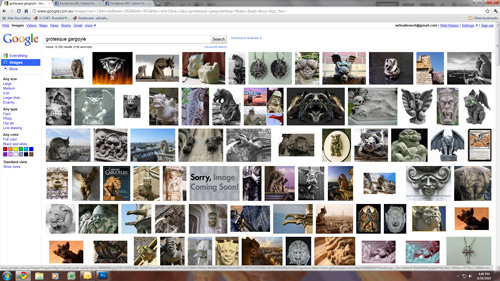
I hop on google image search and browse gargoyes and grotesques for a while, work out what kind of gargoyle I want it to be. Something not too humanoid, but not too dragon, a bit in between.
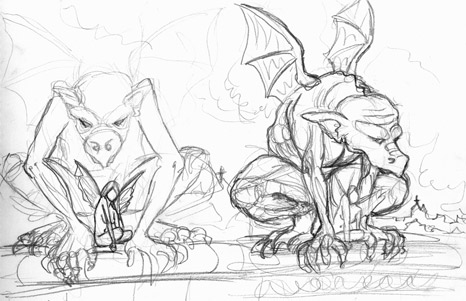
Then it’s time for some rough thumbnail sketches. These are only maybe 5x10cm in size. I did the one on the left first, but decided I didn’t want the scene to be straight on (the sketch also sucks!). So I thought I’d turn it around to the side a bit. I then scan the thumbnail image in and open it in photoshop.
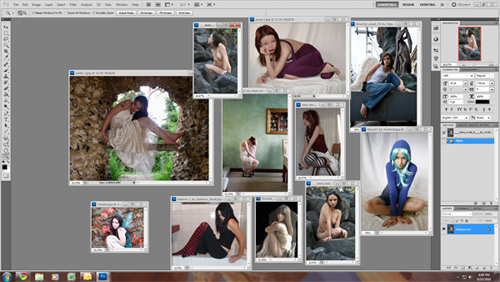
Now, I want to find a model. I know roughly what pose I want my fairy in, but I’m not 100% set on it. So I open up saved reference photos of models (most are from www.deviantart.com and the stock models there). I find one that’s really close to what I want, but not quite.
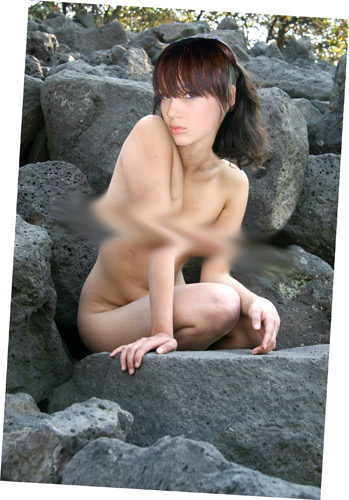
So, I do some quick and dodgy photomanipulation work in photoshop and put a different head on the model. I also want to change the position of one of the arms, but will do that while I’m sketching. Please excuse the very rough censoring here for younger or more prudish readers. This is the body of Amiba Stock and face from ClickyPenPixie Stock on Deviant Art.
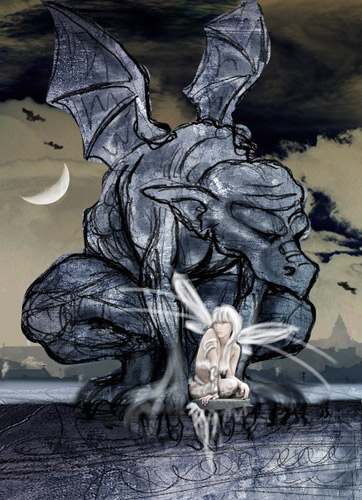
Now, with my model and my thumbail sketch, in photoshop again I do a very quick photomanipulation job to mock up roughly how I want the artwork. I grab a photo of some clouds, a moon, and some rooftops and drop them in, and use my wacom tablet to very messily sketch in some more details. It doesn’t matter if it’s a complete mess, it’s just for me to get an idea of whether the image in my mind will come together, and help me establish the colour scheme and composition. I’ll also print out a copy of this to keep in front of me while painting to keep these things in my mind- you’ll see it in some of the photos below.
Watch me sketch up the artwork in this time lapse video. This is sped up to nearly 10X actual time. Unfortunately the end is cut off because my battery went flat.
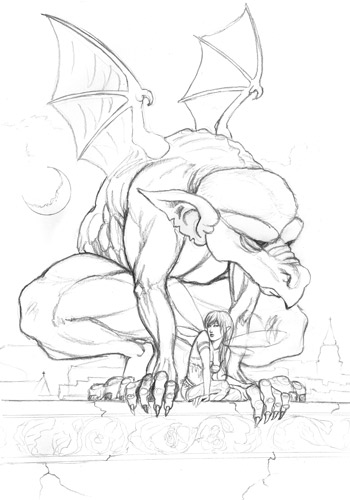
Here I have my sketch, scanned and cleaned up in photoshop. I sketched this just in my sketch book, but am going to blow it up to twice the size (from A3 to A2), and print it using my Epson 3880 printer. The inks of this printer are waterproof and archival, so I can paint right over the printed sketch. I often do this, because it means I can sketch in my sketch book and not worry about ruining good expensive watercolour paper if the sketch doesn’t work.
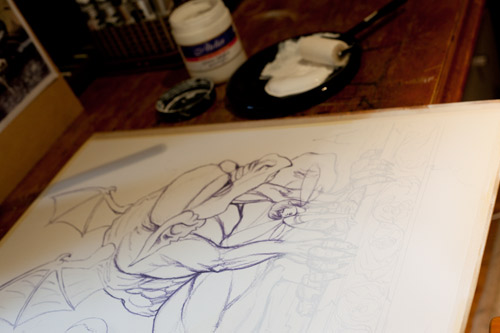
Because I want to paint in darker colours and don’t really require the strengths of watercolour for this work, I’m going to paint entirely in acrylics and gesso the paper first (gesso is a medium for sealing and creating a less absorbent working surface). Even when painting entirely in acrylics I don’t always gesso the paper. If I don’t, it means I use a more watercolour technique of layering transparent colours, but when the paper is gessoed the paint behaves differently, a little more like oils, perhaps. If I weren’t gessoing the paper, I would have lightened the sketch before printing it so it wasn’t as strong as seen here. So here, I’ve taped the sheet of A2 Arches hotpress watercolour paper (what I always use) to a MDF board with masking tape, and begun rolling gesso on with a sponge roller.
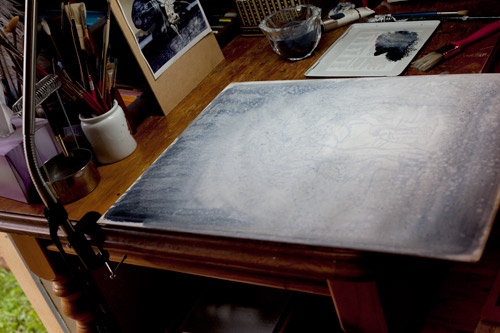
This is going to be a quite dark artwork, with the fairy being the main source of light, so I want to start getting some dark paint onto there and darken the values of the paper down from the bright white it starts at. I get a small house paint brush and Paynes Grey acrylic, and roughly brush the surface, darker at the edges, lighter in the middle. I use a tissue to sponge away paint from the fairy if it gets on there (I’m messy!). This is just about creating texture and darkness, so I’m as messy as I want to me. Rough brush strokes done, I clean the brush, and spatter clean water all over to create those spots you can see. Once that’s dry, I spatter again with watered down paynes grey.
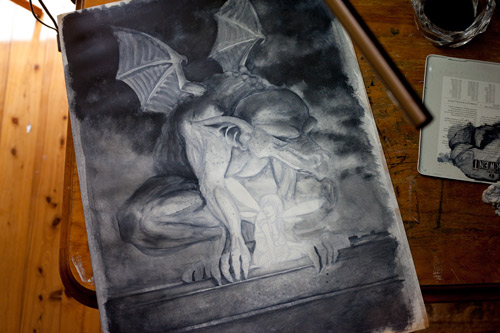
Time to start working on the shapes. I’m still working fairly roughly, it will all be refined more as I go. I just want to block in the forms based on the light source now (the fairy). Still just using Paynes grey and a big brush, I rough out the shapes of the gargoyles muscle structure, the wall and the clouds.
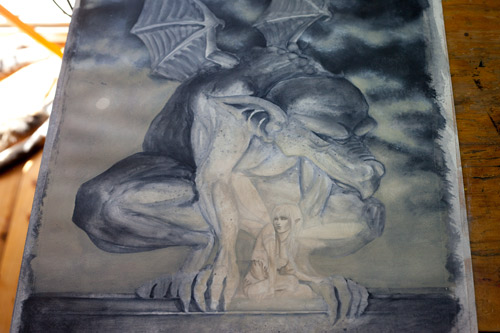
This is basically just going to be a two colour artwork, pale yellows and blue greys. Because the fairy will primarily be golden, I use Raw Umber acrylic to start defining her form a little before I lose her under other paint. I want the sky to have a yellow misty glow as well, so use Naples yellow (opaque) muted down with a little raw umber to smooth out the lower sky area where the darker clouds aren’t, and also brush that same colour all over and around the fairy, and where her light falls on the gargoyle.
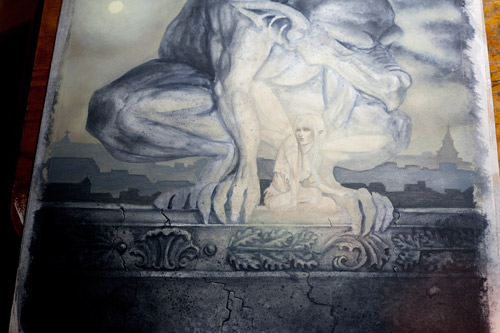
Well, there’s no more avoiding it- time to start working on the details. I’m trying to be good and work from background to foreground here, which generally is the best way to work (but I don’t always do). It’s good to work this way because you want your figures to look like they fit in the environment, so you want the environment there first as a reference for their values and colours when you start painting them. I’ve tidied up the clouds a little with more naples yellow and white paint, and with varying mixes of naples yellow and paynes grey I’ve painted in a few rows of silhouetted rooflines. On the wall itself, I’ve done a number of layers of paynes grey to build up the decorative scroll work carving. You can see it’s changed from my sketch- it was lost underneath the other paint already by this stage, so I sketched something new out on top. Often having to do something again makes you change your mind on what you want there anyway. I paint a few cracks in paynes grey, and highlight the right side with naples yellow, and our wall is basically done.
I want to lighten some parts of the stone wall to look like lichen. Watch how I do it in the following video! You can also use this technique to some extent with watercolour on paper as well.
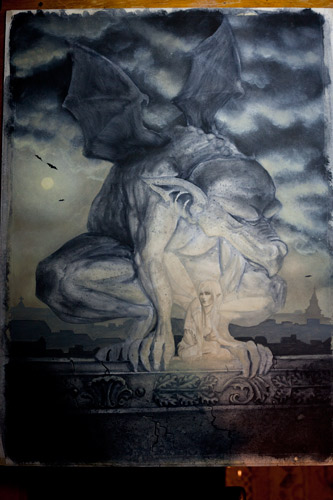
So the background is pretty much done at this stage, but no doubt I’ll poke at it again more later (I also have to add rain, right at the end!). I’ve defined the clouds some more with white and naples yellow, and added a few flying bats (or are they gargoyles?). Now I can move onto working on the two stars of the artwork- the fairy and the gargoyle.
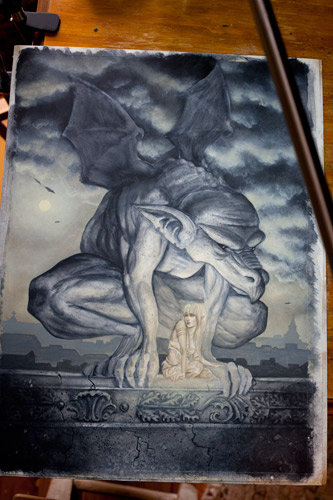
I start working on the gargoyle first, since he surrounds the fairy I need to have him pretty well defined before painting her, since her glow is going to get painted over the top of his details. The rough brush strokes I made before are a great base for refining the details further, and often the rough brush strokes bring out great shapes that you wouldn’t get from careful brush work. I darken edges and smooth some areas, always trying to keep the light source in mind as I work. The gargoyle will be faintly backlit by the moon as well, but I’m mostly focusing on the lighting from the fairy.
Time to paint the fairy. Here’s a time lapse video of me painting the fairy in mostly raw umber and naples yellow. This has only been sped up to 2X normal speed so you can see how my brush strokes are handled.
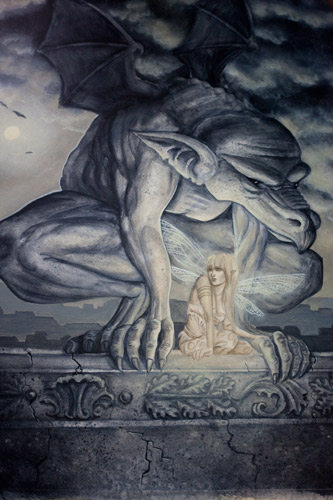
The gargoyle is mostly done now, so I start working on the fairy. She is getting painted in a mix of raw umber, naples yellow and titanium white at this stage. I paint in the veining of her wings in white, and then we get to some more brush abuse, using a very dry brush and scumbling (yes, it’s a word!) some naples yellow all around the wings and the fairy again. Scumbling is the method of glazing a lighter, opaque colour over darker areas of paint. I do a lot of dry brush work when painting in acrylic in this way, and really mash up and scrub my poor brushes.
Here is a short video of me lightening the fairy’s wings using this technique. Normally I keep the tissue in my left hand (as you’ll see in another video), but had my camera in my left hand here so it was a bit awkward with the tissue on the painting itself. I always, always paint with a tissue in my left hand, and end up with a big pile of soggy, paint covered tissues by the end of a painting. They are just indispensible for controlling the amount of paint and water on a brush. I feel naked without one!
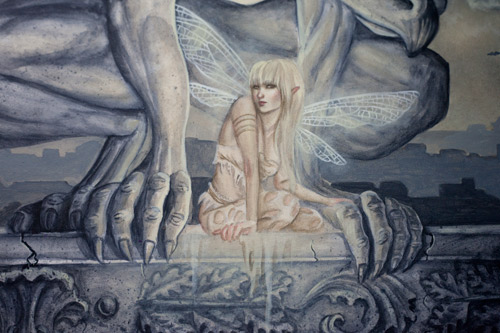
Finally, a little more colour! All I’ve added here to the fairies skin is a few hints of Rose Pink, but it makes her glow even more, doesn’t it? I’ve also decided I want some of her tattered skirts hanging down the wall, so paint them in in a mix of white and naples yellow. I continue refining her features and figure in a mix of all these colours (raw umber, naples yellow, rose pink and white. A tiny bit of paynes grey for her eyes).
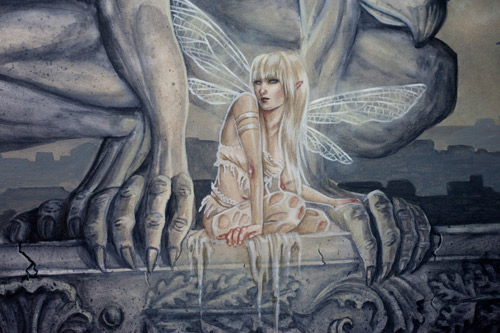
Now we’re cooking. After the fairy has some work with darker colours, I get stuck in with the white and make her glow. I hit all the highlights, and give her a rim glow as well. Since her clothes are essentially a dirty white, they also get highlighted with lots of white. She’s just about done.
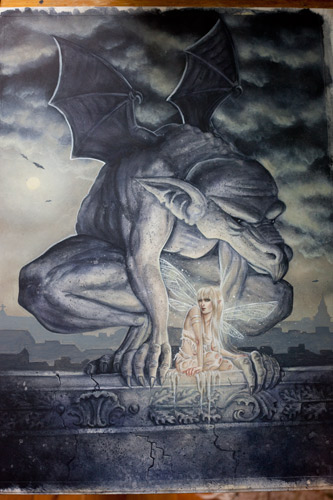
Time to have fun splattering again. I use the same technique on the gargoyle as I used on the wall, spattering with clean(ish) water then rubbing away the lifted paint with a tissue to create lighter spots of “lichen”, and then spattering dark spots of paynes grey as well. Then I spatter white paint all around the fairy by loading a bristle brush and flicking it with my fingernail. I decide I want a hint of colour in some of the grey areas, and with a dry brush I glaze on some dioxazine purple mixed with storm blue, very very thinly in some areas. Did you know the only difference between glazing and scumbling is glazing is dark/transparent colours and scumbling is light/opaque colours? Also here I’ve given the gargoyles wings some rim lighting in white as well.
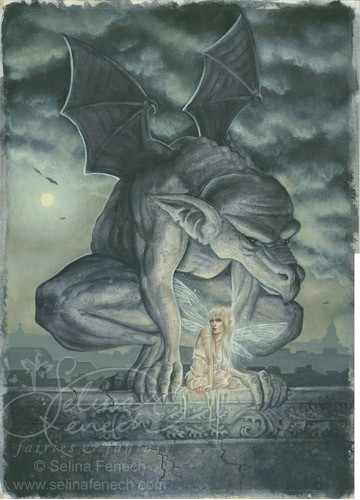
All done now- except for making it rain! Because the rain is going to be painted all over the top of this, I scan the artwork in first, just in case my experimental rain doesn’t work. Above is the scanned image, not yet colour corrected. You can see how different the colours from my scanner turn out compared to the photographs.
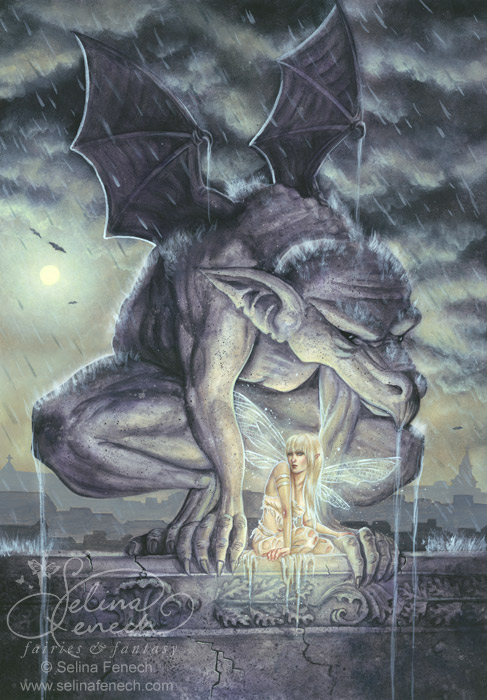
And here is the final artwork with rain added, scanned and colour corrected in photoshop. The rain was added with a large brush, streaking watered down white paint, and watered down paynes grey for the falling drops, and then flicking white paint on with a bristle brush for the areas that are hit with rain.

27 thoughts on “Fairy and Gargoyle Painting Walkthrough- with Videos”
I find it fascinating seeing how others work and develop their ideas. Lovely painting Selina.
Thankyou so much for sharing this.
So exhilarating to see your technique and talent in operation! I have Lucy Cavendish’ deck of Faery Oracle and just love your work. Your art as much an inspiration to my readings as her messages. Thankyou, Blessings to you. Irene.
Wow, that was amazing! So interesting to see your techniques and talent at work.
Turned out to be another fantastic artwork, really love this one.
Thank you so much for taking the time to do this especially as it is not easy to paint holding a video camera.
Really, really appreciated!
Selina, this was a great tutorial, very cool to see all the steps of how you create your work. I also love the end result, the feel and light is wonderful, I love the juxtoposition of the dark and light, the hard stone and the lovely delicate fairy, very nicely done!
Selina, that was such a fascinating and VERY HELPFUL tutorial! Thank you so much for sharing not just your vision and techniques, but also your thought process behind it. It really adds a valuable aspect to the lesson!
I love watching you paint and learning from you. Thank you so much for sharing.
Selina,
Lovely tutorial! Love to learn and watch to paint from you. You’re very inspirational!
beautiful tutorial Selina love the dry brush trick! and the painting is gorgeous !
Hi Selina, I’m an oil painter beginning to venture into painting fantasy, things from my imagination, and it’s wonderful, feels like coming home. I just stumbled across your website and really love how encouraging and open you are, sharing your artists world and perspective.
A heartfelt thanks for taking the time to put so much wonderful inside information up on the net for people like myself.
I hope you have a lovely week,
Magda.
JUST WANTED TO SSAY HOW MUCH I LOVE UR WORK….ITS ONE OF THE BEST ART WORK I HAVE EVER SEEN ….. U HAVE A VERY INTRESTING WAY OF DRAWING UR FAIRIES… THAT JUST SHOWS HOW MUCH U LOVE UR WORK AND MAKE ME COME BACK FOR MORE….SO THANKS
The only words I can verbalise right now are; Oh my god. I’ve be en following your work for nearly a year now, and I always end up staring at the screan dazzled. You are amazing! thank you for putting this on, it give me an insight to how to make my drawing more life like. I would normally spend hours on your website going through your work recking my brains trying to figure out how you do it, but this helps.The tissue tip is great, I use it all the time! I’m not a professional, and my art will never be as good as yours but, I do love faires! I’m drawing them for my art project and exam at school. I love your work, it’s very inspiring and don’t stop because your brillant!
lots of hugs,
Bláthnaid NíhÍr,
14, Ireland.
I know you hear this all the time, but you are simple fabulous. I’ve been following your work for…oh I don’t know…for a long time and often find myself examining every detail of your artwork and try to apply your techniques when I create my own pieces. This step-by-step was very helpful and in all honestly just makes you feel that much more real and even more inspirational. Thank you 🙂
Darn, it all looks so easy when you do it! I one day wish to be able paint like you… if only I had more time to practice. My problem is that I’m just so impatient that I almost always forget to do the background first, I just can’t wait to do the face! I better work on that 🙂 This tutorial was incredibly helpful, thank you so much for putting it on! Can’t wait to see more of you brilliant work soon!
Tena, 15
Croatia
I can’t believe I haven’t seen this early. This would have to be my favourite painting as it seems to capture everything I adore about life; the light and dark and how they seem to compliment each other so completely. Thank you for letting me see how your art comes to life.
JUST WANTED TO SSAY HOW MUCH I LOVE UR WORK….ITS ONE OF THE BEST ART WORK I HAVE EVER SEEN ….. U HAVE A VERY INTRESTING WAY OF DRAWING UR FAIRIES… THAT JUST SHOWS HOW MUCH U LOVE UR WORK AND MAKE ME COME BACK FOR MORE….SO THANKS
I can’t believe I haven’t seen this early. This would have to be my favourite painting as it seems to capture everything I adore about life; the light and dark and how they seem to compliment each other so completely. Thank you for letting me see how your art comes to life.
I know you hear this all the time, but you are simple fabulous. I’ve been following your work for…oh I don’t know…for a long time and often find myself examining every detail of your artwork and try to apply your techniques when I create my own pieces. This step-by-step was very helpful and in all honestly just makes you feel that much more real and even more inspirational. Thank you 🙂
Selina, Lovely tutorial! Love to learn and watch to paint from you. You’re very inspirational!
I LIKE THIS DRAWING ALOT. I HAVE BEEN LOOKING FOR A SERTEN PICTURE OF A GOTH FAIRY WITH A GARGORIAL(SORRY IF THIS IS SPELLED WRONG NOT A GOOD SPELLER)ANYWAY THIS PICTURE IS VERY BEAUTIFUL.I KNOW U PUT ALOT OF WORK INTO IT AND THE DETAIL IS ALSOME. KEEP UP THE GOOD WORK.I’VE BEEN LOOKING FOR THIS SERTEN PICTURE SO I CAN BRING A TATOO THAT I WANT TO GET TO LIFE BUT I NEED TO GET IT DRAWEN UP FIRST AND I’M HAVEING TROUBLE FINDING SOMEONE GOOD ENOUGHT TO DRAW MY PICTURE. THANKS FOR LISTENING HOPE I DID’NT BORE U.
Oh my gosh! Those videos are soooooo AMAZING! Like other people I had always wonderd how in the world you draw and create these pictures! There so detailed and not to mention unreal! Keep making those videos and maybe you could make a video of just you sketching a picture, considering that’s what I mainly do. Just a idea :] Thank You!
Gabby, 16
Thank you so much for sharing your techniques. You are simply amazing. What a brilliant artist you are. And you voice is so calming and relaxing. A real pleasure to watch you paint and listen to. Thank you.
Wonderful tutorial, and great tip with the lichen!
Thanks so much for sharing this great step by step guide 😀
How often would you say you use your Wacom Tablet? Cause I was thinking of getting one to push myself to the next level. Right now I look at a picture and I just start drawing what I see, then it’s a nice keep sake. But recently I’ve been trying to start coming up with my own concepts and creations, and it’s just not coming along well 🙁 So I was wondering if you think getting a tablet, with all the features it has on it like photoshop and painting, would help me in finding my own creative streak?
Hi Gabrielle! I love my wacom tablet, and use it a fair bit. I recently stepped up from an Intuos tablet (A pen and tablet that work seperately to the screen) to a Cintiq, where the screen itself is the tablet, and you draw directly on it. I’m doing a lot more purely digital work now because of that, and really enjoying it. Before I had the Cintiq, I didn’t do much purely digital work, but used my tablet a lot for editing work, composition work, and design work.
But tools are just tools. They can make things a bit easier, but you still need to learn the basics first. I would recommend getting a tablet only if you were planning on developing your digital painting skills. But if you’re still working on finding your style and creating your own concepts, good old fashioned pencil and paper are the best. How about you sign up to Sketch Fest http://ellenmilliongraphics.com/sketchfest/ when it’s held next? It’s fantastic for developing your art- lots of inspiration and practice!
Thank you 🙂 I will definitally take your advice and sign up to Sketch Fest as soon as I can. Thanks!
wonderful work Selina, and one of my favorites! just wondering if you have the link for the female stock image you used?
Hi Selina, I want to start by saying I love your work. Do you use the print out to paint on or is it that you re-draw your artwork after. I am abit confussed. or do you pass watercoloured paper through the printer.
Thankyou Amanda